Chrome OS vs Windows Laptop – A Complete Guide for U.S. Buyers
Choosing the right laptop is not as simple as picking a brand or a good-looking design. One of the biggest decisions you’ll face is the operating system. The debate around Chrome OS vs Windows laptop has become more important in the U.S. as both options continue to improve and serve different types of users.
Some people need a simple device for browsing and daily tasks. Others need a powerful system that can handle demanding software and multitasking. The right choice depends on how you use your laptop every day.
This guide breaks everything down in a clear and practical way so you can understand the real differences and make a confident decision.
What is Chrome OS
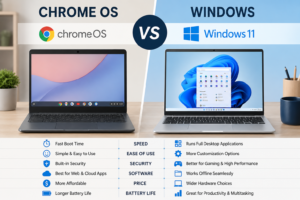
Chrome OS is a lightweight operating system developed by Google. It is mainly designed for online use, where most tasks are handled through a web browser or cloud-based apps.
Key Chrome OS Features
- Fast startup and quick performance
- Simple and clean interface
- Automatic updates
- Strong built-in security
- Deep integration with Google services
Chromebooks, which run Chrome OS, are popular in U.S. schools and among users who want a simple and affordable device.
What is Windows Operating System
The Windows operating system, developed by Microsoft, is one of the most widely used platforms in the world. It supports a wide range of software and hardware, making it a flexible choice for many users.
Key Windows Features
- Support for desktop applications
- Full offline functionality
- Advanced multitasking
- Wide compatibility with devices and tools
- Customization options
Windows laptops are used across different industries in the U.S., from education to business and creative work.
Chrome OS vs Windows Laptop Performance
Performance is one of the most important factors in the Chrome OS vs Windows laptop comparison.
Chromebook vs PC Performance
Chrome OS is designed to run efficiently on lower-end hardware. It performs well for basic tasks like browsing, streaming, and using online tools.
Windows laptops, on the other hand, offer a wider performance range. Entry-level models handle basic tasks, while high-end systems can run demanding software and heavy workloads.
Real-World Performance Comparison
- Chrome OS works smoothly for web-based tasks
- Windows handles complex software and multitasking better
- Chromebooks feel fast for simple use
- Windows laptops offer more raw power
Software and App Comparison
One of the biggest differences in the Chrome OS vs Windows laptop decision is software support.
Chrome OS Software Support
Chrome OS relies on:
- Web applications
- Android apps
- Cloud-based tools
This works well for email, document editing, and online collaboration. However, it has limitations when it comes to advanced desktop software.
Windows Software Support
Windows supports:
- Microsoft Office and similar tools
- Graphic design and video editing software
- Development tools
- Business applications
This makes Windows a better choice for professionals who need specialized programs.
Battery Life Comparison
Battery life is a key factor, especially for students and remote workers in the U.S.
Chrome OS Battery Performance
Chromebooks are known for long battery life because the system is lightweight and efficient.
Windows Battery Performance
Battery life on Windows laptops varies depending on the hardware. High-performance systems may use more power, while efficient models can last all day.
Price Comparison in the U.S.
Budget is often a deciding factor when choosing a laptop.
Budget Laptops USA – Chrome OS
Chromebooks are generally more affordable and are often priced lower than Windows laptops. They are a good choice for users who want value without spending too much.
Budget Laptops USA – Windows
Windows laptops are available in all price ranges:
- Entry-level models for basic use
- Mid-range laptops for productivity
- High-end devices for professional work
This variety makes Windows a flexible option.
Security and Updates
Security matters whether you are a student, freelancer, or professional.
Chrome OS Security
Chrome OS offers:
- Automatic updates
- Built-in virus protection
- Secure app environment
It requires very little maintenance.
Windows Security
Windows provides strong security features but requires user involvement:
- Regular updates
- Antivirus software
- Safe browsing habits
With proper care, it can be very secure.
Storage and Cloud Usage
Storage works differently in the Chrome OS vs Windows laptop comparison.
Chrome OS Storage
Chromebooks rely more on cloud storage, with limited internal storage. This works well for users who store files online.
Windows Storage
Windows laptops offer larger internal storage, making them better for users who handle large files or prefer offline access.
Best Laptops for Students
Students in the U.S. often look for affordable and reliable devices.
Chromebooks for Students
- Easy to use
- Affordable
- Great for online classes
Windows Laptops for Students
- Better for advanced coursework
- Supports more software
- Suitable for long-term use
Productivity Laptops for Professionals
Professionals need devices that support their workflow.
Chrome OS for Productivity
Best for:
- Online tools
- Remote work
- Basic office tasks
Windows for Productivity
Best for:
- Business software
- Multitasking
- Complex workflows
Internet Dependency vs Offline Use
This is a major difference in the laptop OS comparison.
Chrome OS Internet Use
Chrome OS works best when connected to the internet. Some features are limited offline.
Windows Offline Capability
Windows works fully offline, allowing users to complete tasks without internet access.
Pros and Cons of Chrome OS
Advantages
- Simple and easy to use
- Affordable pricing
- Strong security
- Fast performance for basic tasks
Limitations
- Limited software support
- Dependence on internet
- Less powerful for advanced work
Pros and Cons of Windows
Advantages
- Wide software compatibility
- Strong performance options
- Works offline
- Flexible and customizable
Limitations
- Requires maintenance
- Can be more expensive
- Slightly more complex to use
Which One Should You Choose
The choice between Chrome OS vs Windows laptop depends on your needs.
Choose Chrome OS If You:
- Use mostly web-based tools
- Want a simple and affordable laptop
- Prefer easy setup and maintenance
Choose Windows If You:
- Need professional software
- Work offline frequently
- Want more power and flexibility
Laptop Buying Guide USA – Final Advice
When choosing between Chromebook vs Windows laptop, focus on how you actually use your device.
Ask yourself:
- What kind of tasks do I perform daily
- Do I need specific software
- How important is portability and battery life
- What is my budget
Answering these questions will guide you to the right choice.
Final Thoughts
The discussion around Chrome OS vs Windows laptop is not about which system is better overall. It is about finding the right fit for your lifestyle and work.
Chrome OS offers simplicity, speed, and affordability. Windows provides power, flexibility, and broader software support. Both options are strong in their own way.
A smart decision comes from understanding your needs, not just following trends. When you choose a laptop that matches your daily routine, everything becomes easier—from work to entertainment.
Quick Summary
- Chrome OS is simple, fast, and budget-friendly
- Windows offers more power and software support
- Chromebooks are best for online tasks
- Windows laptops handle professional work better
- Your choice should depend on your daily usage
With the right approach, choosing between a Chromebook and a Windows laptop becomes much easier. Focus on what matters to you, and you will find a device that supports your work and keeps things running smoothly.
Leave a Reply