Best Laptop for Programming – A Practical Guide for Everyday Coders
If you’re planning to start coding or already working as a developer, one question always comes up: what is the best laptop for programming? The answer isn’t as complicated as it sounds, but it does depend on how you plan to use your laptop.
Some people write simple scripts, others build websites, and some work on heavy applications. The good news is that you don’t always need the most expensive machine. What you really need is a laptop that feels smooth, reliable, and comfortable for long hours of work.
In this guide, we’ll break everything down in simple terms so you can choose the right laptop without confusion.
Why Choosing the Right Laptop Matters for Programming
Programming is not just typing code. You often run multiple tools at the same time—code editors, browsers, testing environments, and sometimes virtual machines. A slow laptop can make even simple tasks frustrating.
The best laptop for programming helps you:
Work without lag
Run multiple apps smoothly
Compile code faster
Stay productive for longer hours
What Programmers Really Need in a Laptop
Before looking at specific models, it’s important to understand the basic requirements.
Processor (CPU)
The processor is the brain of your laptop. For coding, you don’t need the most powerful chip, but you do need something reliable.
Intel Core i5 or i7
AMD Ryzen 5 or Ryzen 7
These processors handle most development tasks easily.
RAM for Multitasking
If you open many tabs, run code, and use tools together, RAM becomes very important.
8GB RAM → Good for beginners
16GB RAM → Ideal for most developers
More RAM means smoother multitasking.
Storage (SSD vs HDD)
Speed matters more than storage size.
SSD is a must
256GB minimum
512GB recommended
SSD makes your laptop faster when opening files and running programs.
Battery Life
If you work from different places, battery life is important.
6–8 hours is good
More is always better
Display and Keyboard
You’ll spend hours looking at the screen and typing.
Full HD display is enough
Comfortable keyboard is a big plus
Types of Programmers and Their Needs
Not every programmer needs the same setup.
Beginner Coders
If you’re just starting:
8GB RAM is enough
Mid-range processor works fine
Web Developers
For front-end and back-end development:
8GB to 16GB RAM
Fast SSD
Good browser performance
Software Developers
If you build apps or run heavy tools:
16GB RAM recommended
Strong processor
Freelancers and Remote Developers
For daily work:
Lightweight laptop
Good battery
Reliable performance
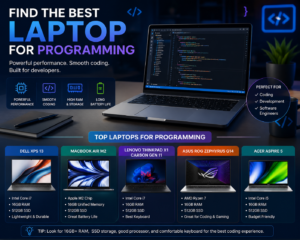
Best Laptop for Programming – Top Picks
Here are some reliable options based on performance, price, and everyday usability.
Top Laptop Comparison Table
XPS 13 Intel i7 16GB 512GB Professional developers
MacBook Air (M1/M2) Apple M1/M2 8–16GB 256–512GB Web development & freelancers
Lenovo IdeaPad 5
8GB 512GB Budget coding laptop
HP Pavilion 15 Intel i5 8GB 256GB Students and beginners
ASUS Vivo Book 15 Ryzen 5 / i5 8GB 512GB Everyday programming tasks
Budget Laptop for Developers
Not everyone wants to spend a lot. The good news is that you can still find a budget laptop for developers that performs well.
Look for:
Ryzen 5 or Intel i5
8GB RAM minimum
SSD storage
These specs are enough for most coding tasks.
Programming Laptop Requirements Explained Simply
When people search for programming laptop requirements, they often get confused by technical details. Let’s simplify it.
CPU → Handles speed
RAM → Handles multitasking
SSD → Makes everything faster
Battery → Keeps you working anywhere
Focus on these, and you’ll make the right choice.
Laptop for Coding vs Gaming Laptop
Some people think gaming laptops are the best choice for coding. That’s not always true.
Gaming laptops:
Are powerful
But heavy and expensive
Coding laptops:
Focus on balance
Offer better portability
Unless you need heavy performance, a normal laptop works fine.
Real-Life Examples
Example 1: Student Learning Programming
A student learning Python or web development doesn’t need a high-end laptop. A simple machine with 8GB RAM and SSD is enough.
Example 2: Freelance Web Developer
A freelancer working with clients needs:
Reliable performance
Good battery life
Lightweight design
Example 3: Software Engineer
A professional developer working on complex projects benefits from:
16GB RAM
Strong processor
Fast storage
Common Mistakes to Avoid
Many people make the same mistakes when choosing the best laptop for programming.
Avoid:
Buying 4GB RAM laptops
Choosing HDD instead of SSD
Overspending on unnecessary features
Ignoring battery life
Tips to Choose the Right Laptop
Here are some simple tips that actually help:
Think about your daily tasks
Don’t chase high specs blindly
Balance performance and budget
Choose comfort for long usage
Best Laptops for Software Development
If you’re working on serious development, you need a machine that can handle more load.
Look for:
16GB RAM
Strong CPU
Good cooling system
This setup ensures smooth performance.
Coding Laptop Under Budget
If your budget is limited, don’t worry. A coding laptop under budget can still do the job.
Just make sure:
It has SSD
At least 8GB RAM
Modern processor
These basics matter more than brand name.
Final Thoughts
Choosing the best laptop for programming is not about buying the most expensive device. It’s about finding a laptop that fits your work style and daily needs.
If you focus on:
A reliable processor
Enough RAM
Fast SSD
You’ll get a laptop that performs well and lasts for years.
Quick Summary
8GB RAM is minimum, 16GB is ideal
SSD is a must for speed
Ryzen 5 or Intel i5 is enough for most users
Choose based on your work type, not hype
At the end of the day, programming is about skill, not just hardware. A good laptop helps, but your consistency and practice matter more.
Leave a Reply